GPT-6 Astra on ChatGPT Plus: Where to Find It, and How the Controls Actually Work
Where GPT-6 Astra appears for ChatGPT Plus users—and why it may not show in ordinary Chat.
On a ChatGPT Plus plan, GPT-6 Astra doesn’t appear in the standard chat window. Instead, it’s available through ChatGPT Work and Codex. Open the toggle at the top of the screen, switch from Chat to Work, and the model selector there will offer it.
Your subscription is fine. The model is not where almost everyone looks first.
Everything below comes from my own paid account during September 2026, with screenshots from those sessions. Plan names and settings for this model have changed more than once, so treat the specifics as a snapshot and confirm them in your own account.
What GPT-6 Astra actually is
OpenAI released GPT-6 Astra on 3 September 2026 as the successor to GPT-5.6 Sol. The headline capability is computer use: rather than only producing text, Astra operates software on your behalf, fills in forms, updates records, and tests what it builds.
That is why it landed in ChatGPT Work and Codex before regular chat. Work is the agentic surface, built for multi-step jobs that end in finished documents, spreadsheets and presentations. Codex is the software engineering side, for people doing real-world development work.
In the API, the model ID is gpt-6-astra, with a context window of roughly 1,050,000 tokens and up to 128,000 output tokens, at about $10 per million input tokens and $50 per million output tokens. Those numbers matter less for subscribers than the practical one: Astra consumes your allowance roughly twice as fast as GPT-5.6 Sol. Hence, the rollout arrived with tighter usage than most people expected.
Access is still rolling out. Two accounts on the same plan can differ, and enterprise administrators have to enable it before anyone in the workspace sees it.
Why GPT-6 Astra is missing from your ChatGPT model picker
ChatGPT is no longer one application. It is three, and they sit behind a small toggle that is easy to scroll past. Chat handles ordinary conversation and search. Work is an agent for longer jobs that produce finished files. Codex covers software development.
Astra did not land in all three at once. On Plus, it arrives through Work and Codex. In the ordinary chat window, the top option stays GPT-5.6 Sol.
There is a second reason the search fails. In Chat, the model is not called Astra at all. OpenAI labels it GPT-6 Pro, described in its own documentation as GPT-6 Pro powered by GPT-6 Astra, and lists that entry for Pro, Business, and Enterprise plans rather than Plus. So a Plus subscriber looking for the word “Astra” in their chat menu is looking for a name that doesn’t exist on that screen, for a model that isn’t offered there anyway.
How to use GPT-6 Astra in ChatGPT Work
Open the ChatGPT desktop app or the web app.
Find the Chat and Work toggle at the top center of the screen.
Click Work.
Open the model selector at the right-hand end of the input box.
Astra appears there by name.
On mobile, Work sits in the dropdown at the top of the screen. Codex is a separate entry in the same menu.
Thinking effort vs. Select model: one ChatGPT control, two jobs
This is where most people get stuck even after finding Work, and it is the part no launch coverage explains.
Both modes put a slider at the right-hand end of the input box. Both open with the same shortcut, Ctrl+Shift+M. They look identical because they are the same component used for two unrelated jobs.
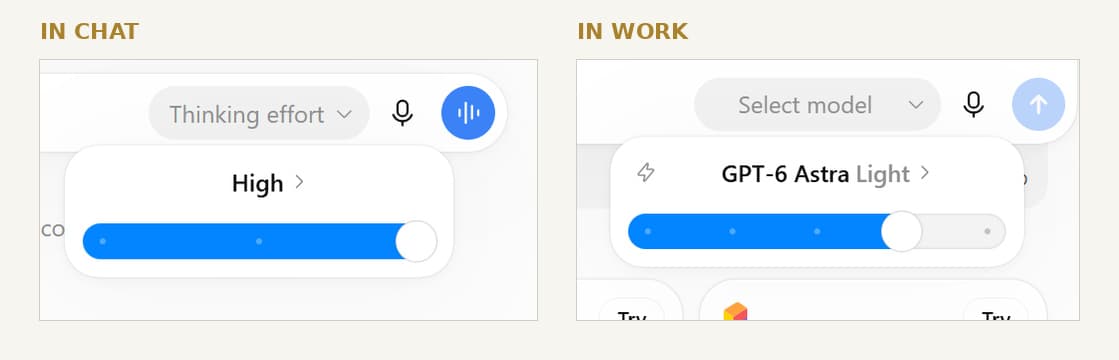
In Chat, it reads Thinking effort and offers Instant, Medium, and High. No model is named anywhere on that screen. In Work, it reads Select model, and the names appear.
The same-looking control does two different jobs: in Chat it adjusts thinking effort; in Work it selects the model.
So the path to confusion runs like this. You upgrade, you land in Chat, you look for a model picker, you find the only thing that resembles one, and it offers three speeds. Concluding that the rollout skipped you is a reasonable reading of that screen.
The two GPT-6 Astra ladders in ChatGPT Work and Codex
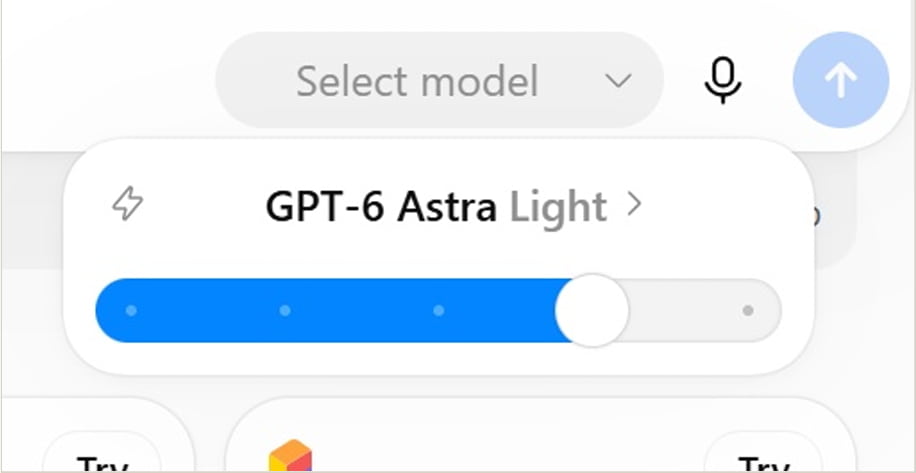
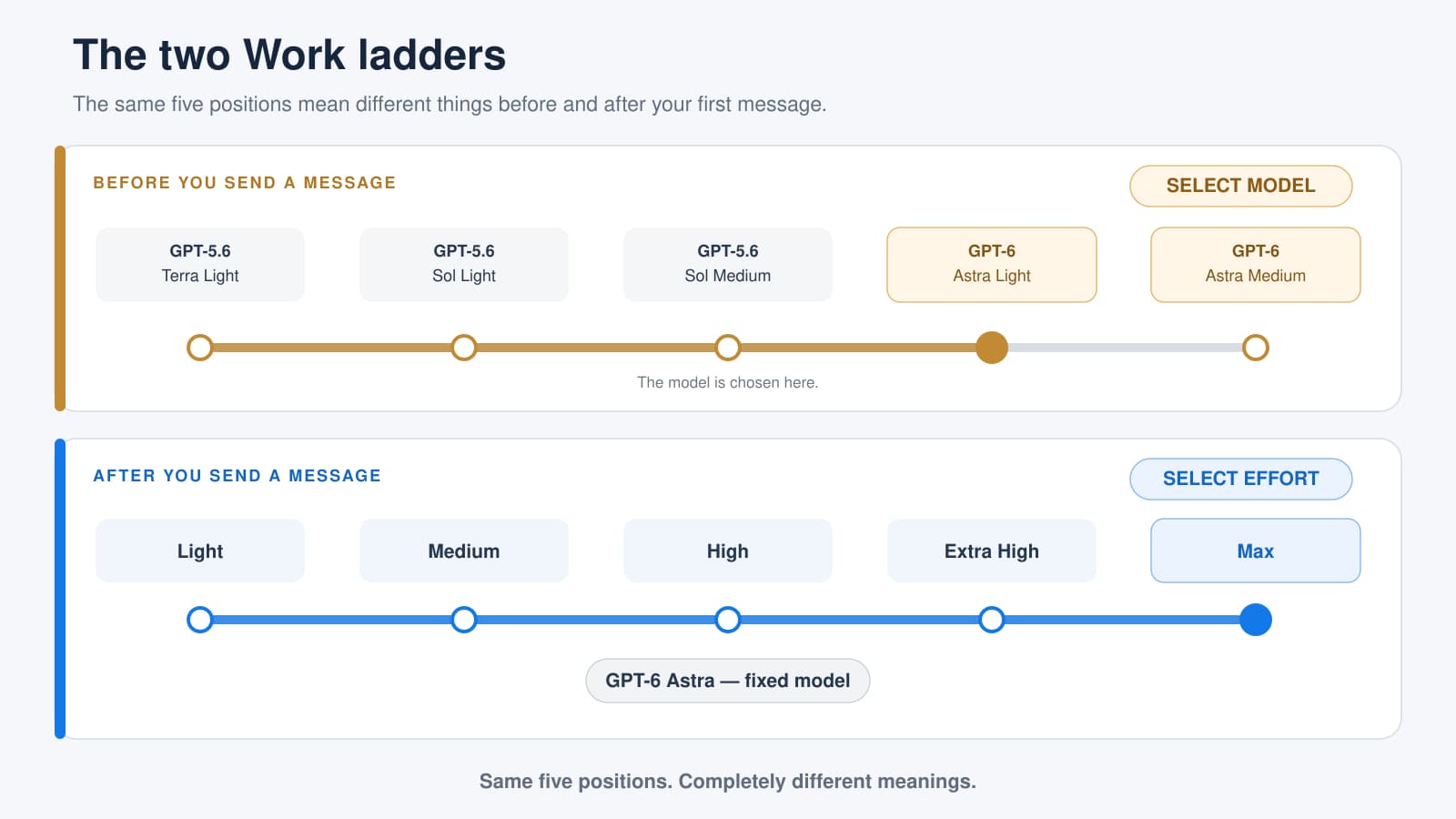
Open the selector in Work, and there is no list. No menu of model names. There is a slider with five positions, and what those five positions mean changes depending on when you look. Before you send your first message, the slider spans five positions across three model families: Terra, Sol, and Astra. GPT-5.6 Terra Light, Sol Light, Sol Medium, Astra Light and Astra Medium. Terra and Sol are the previous generation. The last two are Astra.
Before a Work job starts, the control chooses the model—in this example, GPT-6 Astra Light.
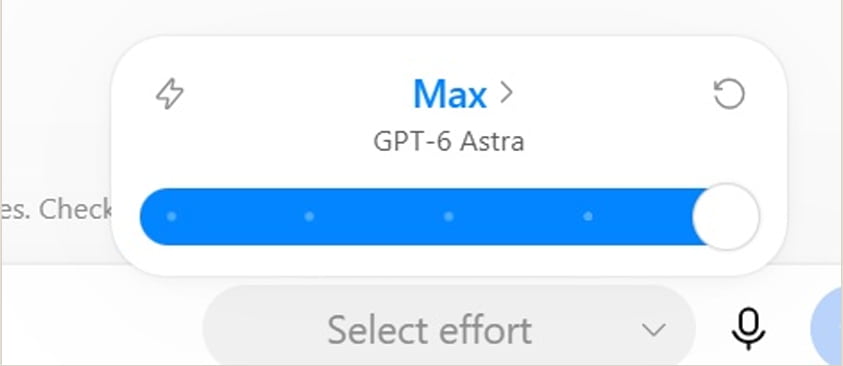
After you send one message, open the same control again. It now reads Select effort, and the five positions are Light, Medium, High, Extra High, and Max. The model name has moved underneath as a fixed label. These map to the effort levels OpenAI exposes in the API: low, medium, high, xhigh, and max.
Once a job starts, the model is fixed and the control changes from Select model to Select effort.
Five positions in both states, with completely different meanings before and after the first message.
Three consequences worth acting on:
Choose your model before you send anything. Once a conversation starts, the model is locked for the rest of it. Begin on Terra by accident, and you stay on Terra until you open a new job.
You may already be using Astra. My account defaulted to position four, Astra Light. Plenty of Plus subscribers are on the new model without having chosen it, while others are hunting for it and concluding they were left out.
The higher effort levels are invisible until you start. Anyone who only checks the control on the landing screen will conclude the ceiling is Astra Medium. High, Extra High, and Max exist, and they only appear once a job is running.
Which ChatGPT plan gets GPT-6 Astra: Plus, Pro, Business and Enterprise
Accurate as of September 2026. Plus and Enterprise users should confirm on their own account page before relying on this.
Plan
Astra in Chat
Astra in Work and Codex
Free
No
No
Go
No
No
Plus
No
Yes, limited allowance
Business Standard
Limited
Limited allowance
Pro
Yes, as GPT-6 Pro
Yes, full allowance
Business Premium
Yes, as GPT-6 Pro
Yes, full allowance
Enterprise
Yes, off by default
Yes
Free and Go plans don’t include Astra; their default model stays GPT-5.6 Luna. Enterprise workspaces have Astra switched off until an administrator enables it, so if you are on a company account, the rollout may not be your problem.
One more thing about allowance. Astra draws on the quota you already have, and it draws roughly twice as fast as the previous model. Sitting at Max all day is how you end up blocked on the afternoon a genuinely hard job matters.
When Plus users get access to GPT-6 Astra
OpenAI said access would expand to all paid tiers “over the coming days” after the 3 September launch, and that is roughly how it has gone. Plus subscribers got access through Work and Codex first, and the rollout has continued to widen since.
Enterprise is the exception worth flagging. Astra was off by default in enterprise workspaces at launch, and enterprise administrators can enable it for their users in the workspace settings. If Astra is available on your plan but not in your account, check that setting first.
Because the rollout is gradual, two colleagues on the same plan can genuinely see different options on the same day. If you do not get access immediately, waiting a day is usually more productive than troubleshooting.
GPT-6 Astra not showing? Five things to check
Check which mode you are in—Work, not Chat, on Plus.
Update the desktop app. Older builds do not show it.
Update Codex if you use it. It needs version 0.153.0 or newer; an older version hides the model instead of explaining why.
On Enterprise, ask your administrator—nothing you do from your own account changes that setting.
Give it a day. The rollout runs gradually and can reach different surfaces at different times, so two accounts on the same plan genuinely can differ.
Want the whole setup documented? I put every plan, both ladders and all five positions, into a 99-page guide built entirely from live sessions, with the screenshots to match: Use GPT-6 Astra at Work.
How to use GPT-6 Astra once you can see it
Finding the model is the easy part. Astra is built to take on jobs rather than answer questions, and that changes what you type.
A brief has five things: the outcome you want, the material to work from attached rather than described, the standard you will judge it by, the boundary it must not cross, and the check it should run before handing anything back.
The boundary line does more work than the other four together. Mine is one sentence.
If you need a detail I haven’t given you, ask me before writing rather than guessing.
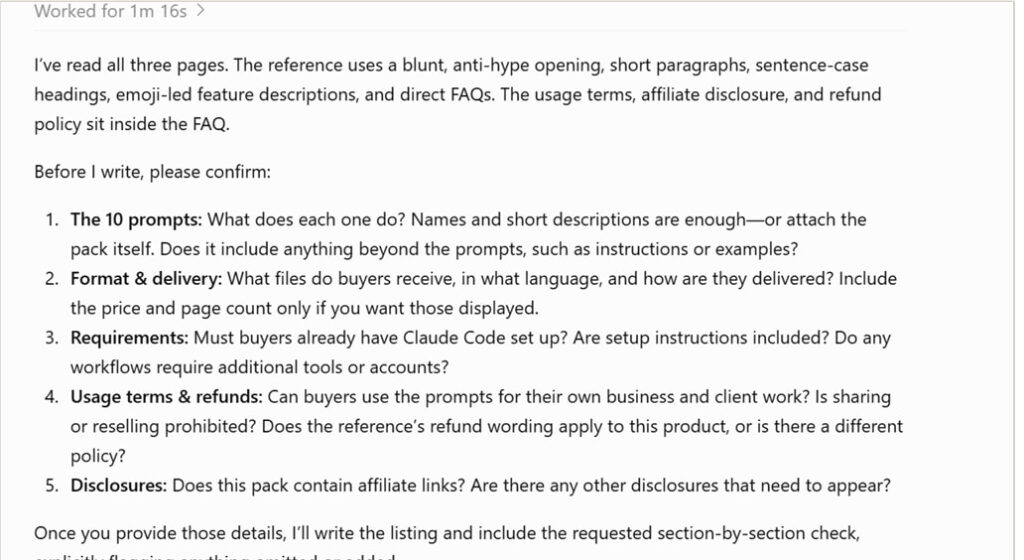
I tested that on a product listing. Without the line, Astra produced a complete listing in 83 seconds, with a price, a page count, ten feature names, and four bonus items, all in confident bold. With the line, it wrote nothing and asked five questions first.
Astra asked about the product’s features, format, requirements, terms, and disclosures before writing the listing.
Two of those questions had no answer, because my own live listing had no usage terms and no refund policy. A one-line instruction audited my product page.
How to check what GPT-6 Astra gives you
The uncomfortable part of working this way is that a correct answer and an invented one look identical on screen: same bold type, same specificity, same confidence.
I built a test spreadsheet with 49 rows of sample sales data and planted seven errors. Astra found all seven with exact cell references, plus two problems I hadn’t planted. One was a duplicated row.
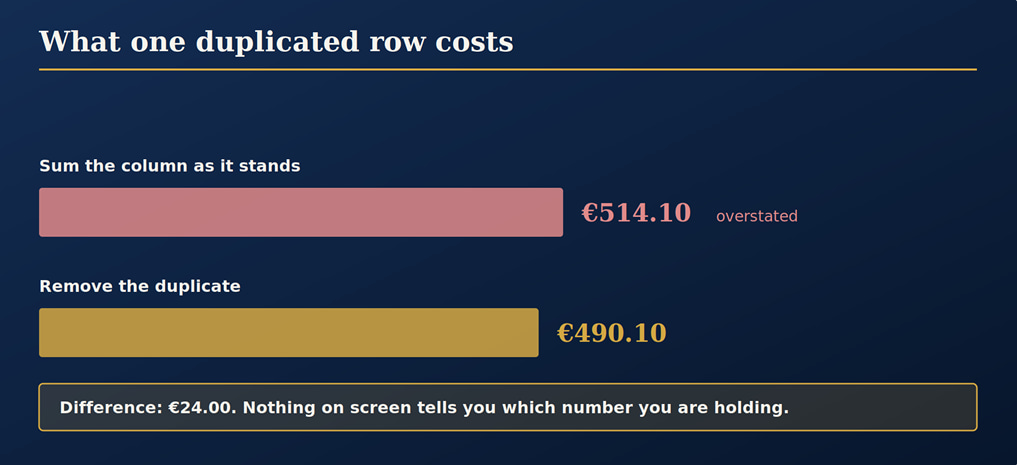
These are known numeric subtotals; one N/A amount remains unresolved.
Adding the amounts as entered gives €514.10. Removing the duplicate row gives €490.10. Both totals look believable, and nothing on screen tells you which one you are holding. One amount is marked N/A, so both figures exclude it. The €24 gap between them is the duplicate.
What GPT-6 Astra will not do
Astra is strong on complex work that runs for minutes, but it is not unlimited. OpenAI gates its advanced cybersecurity capabilities, and the public model declines requests such as writing proof-of-concept exploits.
It also offers less visibility than older models. The API returns a summary rather than a raw chain of thought, so you are billed for reasoning you cannot read. For ordinary business use, that matters less than it sounds, but it reinforces the habit in the previous section: check the artifact it hands you, not the process it claims to have followed.
Whether any of this amounts to general intelligence is a debate happening well above the level of most people’s Tuesday. What changed for working users is narrower and more useful: the model now finishes long jobs and hands back files.
GPT-6 Astra on ChatGPT Plus: FAQ
Is GPT-6 Astra free?
No. Free and Go plans don’t include it, and the default stays GPT-5.6 Luna. Paid access starts with Plus, where it appears in Work and Codex rather than in standard Chat.
Is ChatGPT 6 Astra the same as GPT-6 Astra?
Yes. People write it both ways. OpenAI’s own name is GPT-6 Astra, and in normal chat on the higher tiers you will see it as GPT-6 Pro instead.
Why is it called GPT-6 Pro in the chat window?
That is OpenAI’s own naming. Its documentation describes the entry as GPT-6 Pro, powered by GPT-6 Astra. In Work and Codex, you see the Astra name directly, which is why the same model appears under different labels depending on where you are standing.
Does ChatGPT Plus include GPT-6 Pro?
No. The GPT-6 Pro entry in the chat picker is listed for Pro, Business, and Enterprise. Plus reaches Astra through Work and Codex.
Do I need to be a developer to use ChatGPT Work?
No. OpenAI positions Work for research, analysis, and producing documents, spreadsheets, and presentations. Codex is the software-development side, and you can ignore it entirely if you do not write code.
Can I use GPT-6 Astra through the OpenAI API?
Yes, with the model ID gpt-6-astra. The standard launch price was roughly $10 per million input tokens and $50 per million output tokens, which is higher than the previous generation. However, OpenAI reports Astra uses fewer output tokens on agentic tasks.
What does GPT-6 Astra cost in the API?
The model ID is gpt-6-astra, at roughly $10 per million input tokens and $50 per million output tokens, with about 1,050,000 tokens of context and up to 128,000 output tokens. Pricing changes, so check the current rate before budgeting.
Is GPT-6 Astra better than Claude Opus 5 or Claude Fable 5.1?
On published benchmarks, Astra leads on agentic and coding work, while Claude Fable 5.1 leads on some broader reasoning measures. For ordinary business work, the difference matters far less than how you brief the model, which is what the rest of this page is about.
Does GPT-6 Astra use fewer output tokens than older models?
OpenAI reports that it does on agentic tasks, which is part of why it can cost more per token while sometimes costing less per finished job. On a ChatGPT subscription rather than the API, you’ll notice the allowance draining faster.
Astra was in my picker yesterday, and now it is gone. Why?
Two common causes. You may have used up your allowance for the current window. Or the rollout shifted, which has happened to Codex users more than once.
Is Astra worth it over GPT-5.6 Sol for everyday work?
For short questions, often not enough to justify the allowance it consumes. It earns its cost on long, multi-step jobs that produce files, and on anything where being slightly wrong would cost you an hour of rework.
The full method, with the exercises
The full guide includes 99 pages, six practice exercises, and an answer key.
Everything above is the short version. The complete guide runs to 99 pages, includes a six-exercise workbook, and ships with the broken spreadsheet from this article plus a full answer key so you can score your own account:Use GPT-6 Astra at Work

One Response